
English French German Spain Italian Dutch Russian Portuguese Japanese Korean Arabic Chinese Simplified
Showing posts with label info. Show all posts

Hp IMO G10 - Bisa Merekam Siaran TV Ke Handphone

Posted by mezzoe blog on Friday, August 20, 2010 0 komentar


Tak seperti ponsel online kebanyakan, IMO G10 mencomot konsep disain Nokia N97 mini. Yakni QWERTY slide, dengan bodi yang mungil dan elegan. Layar TFT-nya cukup luas, diagonalnya 3.0 inci.

Seperti halnya merk lokal lain, IMO G10 juga dibekali kemampuan Dual On GSM. Fasilitas online pun tetap ditanamkan. Ada FAcebook, Yahoo Messenger dan eBuddy untuk chatting serta Opera Mini sebagai browser internet via network GPRS.

Untuk fitur hiburan, tersedia TV tunner dengan kemampuan merekam siaran TV, Audio/video player, kamera 2 MP+Flash serta radio FM. Menariknya, IMO G10 juga ditanamkan aplikasi office semisal E-book reader, DocViewer dan MobilePDF.

Rencananya, ponsel ‘Nokia Wannabe’ ini bakal dibanderol dengan harga Rp 1.260.000,- plus kartu microSD dalam paket penjualan.

Spesifikasi:
Jaringan: Triband GSM (900/1800/1900 MHz) & Dual On GSM; Layar: 3.0 inci, TFT warna; Transfer data: GPRS; Kamera: 2 MP, Video recording, flash; Memori ekternal: microSD; Messaging: SMS, MMS; Konektivitas: Bluetooth (A2DP support), kabel data, audio jack 3.5mm; Browser: WAP, Opera Mini; Fitur lain: Polifonik (MP3), TV Tunner, TV recording, Multimedia player, radio FM, MobilePDF, DocViewer, Hadwriting, Facebook, Yahoo, eBuddy, Java, Audio recorder, Calendar, task, alarm, world clock, calculator, unit converter, currency converter, health, stopwatch, E-book reader, Call Blacklist, Speakerphone, Game; Baterai: Lithium ion


[sumber:SMB]
Continue...


3 Best Lightweight PDF Readers, Viewers – Free PDF File Reader

Posted by mezzoe blog on Saturday, August 07, 2010 0 komentar

One of the must have applications for a PC, Laptop would be a PDF reader. Adobe PDF reader is fine… but very slow. Here are 3 cool pdf file readers which are hardly 1MB in size and loads really quickly. So if you need to view your pdf files easily and quickly, choose any one below.
Similar : Boost Adobe Acrobat Loading Speed

3 Cool Free Lightweight PDF File Readers

Cool PDF Reader (Link) – Smallest PDF Reader

Lightweight PDF Readers, Viewers - Free PDF File Reader
The world’s smallest PDF viewer/reader to view, print, and convert PDF files to TXT, BMP, JPG, GIF, PNG, WMF, EMF, EPS. It is only 650KB for download and doesn’t need lengthy installation, just download and run. Freeware!  A FREE light-weight PDF viewer for anyone! This viewer basically has all the features of Adobe Reader, but unlike Adobe Reader, Cool PDF Reader loads PDF files extremely fast. The conversion from PDF to text and graphics formats is totally free!

Slim PDF Reader (link) – Fastest PDF Reader

Lightweight PDF Readers, Viewers - Free PDF File Reader
Slim PDF Reader is the smallest desktop PDF Reader in the World. At a download size of only 1.43MB, it is just 5% of the size of Adobe Reader yet it views 100% of the PDFs. Slim PDF Reader is fully featured for viewing and Printing PDFs and eliminates the bloatware and useless features of other PDF readers. It starts up fast and helps your computer run faster. Slim PDF Reader has one simple focus: Read, view and print your PDF files.

Sumatra PDF (Link) – Simple PDF Viewer for Windows

Lightweight PDF Readers, Viewers - Free PDF File Reader
Sumatra PDF is a slim, 1.7MB, free, open-source PDF viewer for Windows. Portable out of the box. Sumatra has a minimalistic design. Simplicity has a higher priority than a lot of features. It’s small and starts up very fast. It’s designed for portable use: only one file so you can run it from external USB drive. Doesn’t write to registry.
Also See : Edit a Read Only Secured PDF File
Related posts:

[Source by:  SnapHow.com : Web & Computing Tips]
Continue...


Remotely Manage, Control PC with Mobile Phone, iPhone

Posted by mezzoe blog on Tuesday, August 03, 2010 0 komentar

Nowadays, thanks to OS powered smart phones, a lot of apps have helps users to take mobile computing to the next level. There already remote desktop programs for PCs, mobiles and tablet devices. But here is a new tool called PC in My Hand which will help to control pc with mobile remotely.

PC in My Hand (Link) – Control PC with Mobile Phone

Want to access your PC anytime, anywhere, but don’t like an always-on system? Now, with a few easy steps, PC in My Hand will help you realize your ideas: boot and control your system remotely from internet use your any mobile devices when you need it. Available for iPhone, Android, BlackBerry, Windows Mobile/PPC, Nokia/Symbian, Palm, ipad or other Notebook and more.
Remotely Control PC with Mobile Phone, iPhone
  • Remote control – Turn your PC on remotely, as well as shut down, restart…
  • Webcam capture – Keep a watchful eye on your office, house
  • File transfer – Transfer your files between client device and remote PC
You need to create an account and bind the settings. For the application to work, you need a PC with a wired network interface card (LAN card) that supports Wake on LAN and also a Router connected to Internet.
Remotely Control PC with Mobile Phone, iPhone
After the setup you can connect to your router (modem) from (PC in My Hand)’s online app. from your mobile and use it to your benefit. Initial process of setting up PC in My Hand is quite long  so you can read complete setup guide with screenshots here.

Also See : Stop Mobile Advertisement Calls, Promotional SMS on Indian Networks
Related posts:
[Source by: SnapHow.com : Web & Computing Tips]
Continue...


Create, Apply Out of Focus Effect like Tilt Shift on Photos Online

Posted by mezzoe blog on Saturday, July 31, 2010 0 komentar

The phrase "tilt shift" describes a photographic technique that is used to create special selective focus effects when taking a photo. A type of camera lens that can be moved (shifted) and pointed at different angles (tilted) is used. This can have the out of focus effect on the photo in unusual ways.

TiltShiftMaker (Link) – Transform Normal Photos into Selective Focus, Tilt Shift

TiltShiftMaker lets you easily transform your existing digital photos into cool miniature style pictures. Usually you would have to do this by following tutorials in image editing software. Now you can do it in a few easy steps – all online free.


Note: TiltShiftMaker is not intended to replace or fix blurred images and layering functionality present in dedicated photo packages, however it should give you an easy way to try out the tilt-shift effect for your photos. See their tutorial pages with suggestions on choosing a photo for more details.
Tip : You can also use a image editing program called photoscape, which can be downloaded free and can be used for various imaging functions including titlshift.

Also See : Make Yourself Look Older in Photos, Pictures Online
Related posts:
[Source by: SnapHow.com : Web & Computing Tips]
Continue...


How to Withdraw Paypal Cheque in India – Details

Posted by mezzoe blog on Saturday, July 31, 2010 0 komentar

A serious blow to Paypal users in India. In accordance with RBI rules and regulations on international money transfer, Paypal was forced to shut down its electronic fund transfer functionality in India starting on August 1, 2010. From July 29, 2010 onwards, you will only be able to request for a cheque withdrawal of funds from your PayPal account.

How to Request a Check from PayPal :

How to 
Withdraw Paypal Cheque in India
  1. Log into your PayPal account, click on ‘Withdraw’.
  2. Click on the ‘Request a cheque from PayPal’ link.
  3. Enter the withdrawal amount and select your mailing address, then click ‘Continue’.
  4. Click ‘Submit’ to confirm your request.

Downsides and Things to Remember while Withdrawing Paypal Cheque in India

  • Denomination – Although I have never used the cheque withdraw facility, people ask whether the cheque will be in INR or USD ?. Well using the Request a check from PayPal option, Paypal converts all your money to your Local Currency ie Indian Rupees and sends you as a paper check.
How to 
Withdraw Paypal Cheque in India
  • Processing Charges – Previously Paypal charged 5$ as processing fees. But from now on PayPal is not charging $5 because as any good corporate house, it’s not wise to charge your customer for an option when you are not giving them alternative.
  •  Time – Foreign currency checks generally takes 21 days to clear! Also added is 5-7 days time in postal delay. The bad thing is that they send the cheque via Post. And not like Adsense does via Blue Dart’s secured delivery. So this might create problems because one can’t trust postal services in India much. (Atleast I never got anything in time)
  •  Bank Fees – Banks do charge for converting $Dollar cheques to local currency conversion. But since Paypal sends the cheque in INR (unconfirmed) there may not be any fees charged. You also save the 5$ for the time being.
Note: Paypal used to charge some money while converting to INR in Electronic Transfer too. Till date I have seen that if the dollar rate if Rs47, Paypal converted at Rs45 as the conversion rate. So this might still be applicable to cheque withdrawals too.
  •  When will EFT be Back – No one can say. This is not the first time Paypal faced issues with RBI India. Seems that this time it may be permanent. And Requesting a check from PayPal may be the only option to get your hard earned money.
We will back with some more updates on the issue… Please leave your feedback or any update you know of.

Also See : Get Email Alerts when Blue Dart Adsense Shipments are Dispatched
Related posts:

[Source by:  SnapHow.com : Web & Computing Tips]
Continue...


Mau Main Game AVA / Alliance Valliant Arms? Game Saingan Point Blank

Posted by mezzoe blog on Sunday, July 25, 2010 0 komentar

Game AVA - Alliance Valliant Arms calon pengganti  PB. Game yang satu ini banyak yang bilang bagus dan mantab. walaupun belum sepopuler PB saat ini. Sudah bosan dengan cheater di PB? mungkin sebaiknya temen-temen coba game yang satu ini. game ini memiliki tampilan grafis yang bagus, selain itu, ada fitur hacking report, jadi kemungkinan ada cheater di game ini dapat ditekan seminimal mungkin. Bagi yang penasaran dengan preview game ini

Untuk spesifikasi game ini juga tidak tergolong berat, berikut spesifikasinya :

Minimum Specs

CPU: Intel Pentium 4 2.4Ghz
RAM: 1GB
GPU: Nvidia GeForce 6600 128mb (GPUs made before this model MAY work, but is not tested or supported) To compare your GPU with the stated GPU, click here: http://www.nvidia.com/page/geforce_6600.html
HDD: Preferably 5GB for furture updates
OS: Windows 2000, XP, Vista and 7
DirectX Version 9.0C 


Recommended Specs
CPU: Intel Pentium 4 3.0Ghz or better
RAM: 1GB or more
GPU: Nvidia GeForce 7600GT 256mb or better To compare your GPU with the stated GPU, click here: http://www.nvidia.com/page/geforce_7600.html
HDD: Preferably 5GB for furture updates
OS: Windows 2000, XP, Vista and soon 7 (It is not confirmed how it will run on Windows 7)
DirectX Version 9.0C

Cara Download game AVA :

1. Klik http://ava.ijji.com/

2. Download terlebih dahulu Ijji Reactor.

3. Download game AVA yang ada di Ijji Reactor yang telah di download (langkah 2).

4. Install.

Cara yang lebih lengkap :


1. Registrasi id, verifikasi, download installer ijji reactornya

2. Install ijji reactornya

3. Kalo udah, coba login pake id tsb, trus secure sign-innya jangan diconteng (ga tau pengaruhnya sih )

4. Lalu klik icon AVA, trus keliatan dah tombol "download". Kalo udah sampe sini ijji reactor agan aman dah

5. Log out dari ijji reactornya, trus direct download clientnya (ini nih yg lama )

6. Install deh client nya.

Ada user yang menyebutkan, dalam game ini kita bisa  memodif senjata kita sendiri, sperti ditambah scope, laser, dll.


Sinopsis Game AVA :


Republics of Commonwealth of Independent States which were once scattered into pieces with a fall of former Soviet Union, comes together for reintegration under the leadership of the president of Russia - 'Vladimir Mashkov', a conservative ultranationalist. On the anniversary of national founding day of Soviet Union (December 30th), great empire of NRF (Neo Russia Federation) comes to life with its territory occupying 1/6 of earth's land surface and having 3rd largest population in the world after China and India.

Mashkov revives Warsaw Pact under the cause of protecting the Eastern Europe's sovereignty from unjustifiable interventions of US and EU. Eastern Europe countries suffering from great changes permeating in with an introduction of capitalism accepts this treaty thinking that this may be a new opportunity. Some countries opposing the pact had no choice but to let in NRF's troops into their territory. During this time, power of military gets overwhelming and thus starts to look for something or someone to let out this uncontrollable power. Mashkov in search of targets to gush out this massive power to relieve ever worsening internal complications finally turns his attention to the Black Sea, strategically important area connecting Southeast Europe and Asia. This decision did not meet just someone to bully around, but implied more barrels of oil to keep his great empire running. As a result, democracy falls apart in some Middle East countries and new pro-NRF government starts appearing.

EU, concerned about NRF's rapid expansion, requested immediate evacuation of NRF troops from Eastern Europe and to stop intervention in Middle East countries through all diplomatic channels but Mashkov ignores it. In addition, non EU members plus poor Southern Europe and North Africa countries, those which have been discriminated even though they were members of EU, demonstrated supportive position for NRF with high expectations on this new order in Europe. This extremely fast growth of NRF starts to cast dark clouds that may possible swallow entire Europe. Switzerland and Austria quickly declares neutrality in hopes to survive this gloomy period in Europe.

In January of 2011, as all political and economical approaches failed, EU forces with troops from Germany, France, England and Northern Europe lights up a fire of war by attacking NRF troop stationed in Poland. This was the beginning of never ending Europe War. NRF forces in hunger of war retaliated with great force and EU had to retreat from Poland after suffering substantial loss. NRF's retaliation did not end, rather, they crossed the border of Germany with great number of troops. EU forces tried to stop NRF's troops flooding in from the East but nothing could stop them. NRF comes to occupy entire Germany and even Eastern area of France and maintains aggressive march to completely eliminate key members of EU.


while attacking EU, carries on a negotiation with China and requests to restrain armed intervention by US in return of oil resources distribution in Middle East. US being restrained by China gets hands tied down, disabling active participation in Europe War. However, China feels threatened by this shocking growth of NRF and suddenly changes its position. New wind starts to blow from the west and Zephyr brings US soldiers with her.

EU forces supported by US troops are now in ready for major counterattack… EU forces supported by US troops are now in ready for major counterattack…


This posting includes an audio/video/photo media file: Download Now


Releated Posts :


[Sumber: SMB]
Continue...


Cara Setting Untuk Mematikan Lampu BackLight BlackBerry Otomatis

Posted by mezzoe blog on Sunday, July 25, 2010 0 komentar

BBLight adalah aplikasi backlight untuk ponsel Blackberry yang memungkinkan Anda untuk menetapkan waktu panjang ketika layar Anda akan dinonaktifkan. Hal ini sangat berguna jika Anda berada di pesawat atau bepergian dengan cara lainnya dan Anda menonton video lagi.


Terms: download aplikasi bblight, matikan backlight blackberry, aplikasi nonaktifkan lampu belakang blackberry, cara menghemat baterai blackberry dengan matikan backlight, software khusus blackberry untuk hemat batere.

Releated Post :


[Sumber: SMB]
Continue...


Tablet Huawei SmaKit S7: Spesifikasi & Fitur SmaKit S7

Posted by mezzoe blog on Sunday, July 25, 2010 0 komentar


Tablet yang menggunakan sistem operasi Android 2.1 Eclair ini juga tipis dan cukup ringan. layarnya yang berukuran 7 inci juga memungkinkannya untuk dimasukkan ke dalam saku celana, seperti kebanyakan perangkat genggam lainnya. Perangkat ini dilengkapi layar sentuh resistif WVGA, dengan resolusi 800x480/16:9.

SmaKit S7 juga menyediakan berbagai fitur-fitur hiburan, seperti Hi-Fi audio player dan video definisi tinggi (HD). Peranti ini juga ditanami high speed web browser untuk kecepatan pengguna dalam berselancar di internet.

Sebagai perangkat android, SmaKit S7 juga memungkinkan penggunanya mengakses puluhan ribu aplikasi yang disediakan di Android Market. Tablet ini juga sekaligus berfungsi sebagai ponsel, dengan dukungan jaringan HSPA/UMTS/GPRS/GSM dan fitur konektifitas Wi-Fi.

Peluncuran SmaKit S7 ini bersamaan dengan peluncuran semboyan atau tagline global terbaru vendor ini, yaitu "Smart Device, Simple World" yang digelar di di Ritz Carlton Pacific Place, Jakarta. Peluncuran ini juga bertepatan dengan pembukaan Indonesian Cellular Show 2010 (ICS 2010) di Jakarta Convention Centre, dimana Huawei turut berpartisipasi menggelar produk-produk terbarunya di booth M06 di pameran tersebut.

Spesifikasi Huawei SmaKit S7

Spesifikasi dari S7 adalah menggunakan OS Android versi 2.1, layar kapasitif dengan lebar 7 inci WVGA 800x480, trackpad yang responsif, kamera 1.3MP yang merupakan kamera depan, Sensor gravitasi, Bluetooth 2.1, Micro USB 2.0, Wi-fi, Speaker Hi-fi, Jack Audio 3.5 mm, Memory Internal 8GB hingga mendukung 32GB, dan sim slot card. Perangkat ini telah menggunakan prosesor Snapdragon dari Qualcomm.

Fitur Huawei SmaKit S7

Huawei S7 juga dilengkapi aplikasi multimedia yakni media player dan foto browser. Bisa juga konek langsung ke TV melalui HDMI. Bisa digunakan untuk eBook juga. Untuk harga masih dirahasiakan karena belum ada kepastian harga yang akan dijual dipasaran.

Harga Huawei SmaKit S7

Tablet Huawei SmaKit S7 akan dilepas dikisaran harga 3-5 juta rupiah dengan mengincar kelas ekonomi menengah. Keempat produk diatas akan dimasuk Indonesia pada semester ke-2 tahun 2010 ini.


Terms: Hp Huawei SmaKit S7, Harga Huawei SmaKit S7, Spesifikasi Huawei SmaKit S7,Fitur Huawei SmaKit S7.

tempointeraktif

This posting includes an audio/video/photo media file: Download Now


[Sumber: SMB]
Continue...


Make a Portable Cardboard Laptop Stand [DIY] Within 2 Mins

Posted by mezzoe blog on Sunday, July 25, 2010 0 komentar

Recently I was looking for a quick way to make an laptop stand to mount it on my table. I found various DIY guides to do so but the best is the one I found at greenupgrader.
They have already provided the required stencil cutout. All you have to do is to utilize 2 minutes and cut out the parts from a piece of cardboard and you’re done.
Long time back we had posted about paper folding to make cool cd, dvd paper case envelopes, but this cardboard laptop stand is awesome.

Create a Cardboard Laptop Stand, Mount

Step 1 : Download the full scale stencil pattern of the parts (Click Here) and print it. You can also zoom view to 100% and trace it out from your monitor.
Step 2 : Take a hard cardboard and use stencil 1 to cut out a double sided piece from it (see below). Also cut 2 pieces of stencil 2.Make a 
Portable Cardboard Laptop Stand [DIY]
Step 3 :  Put it all together. Just place both the wide pieces into the slits of the longer piece and align their slits to form a lock as show below.Create a Cardboard Laptop Stand, Mount
Step 4 : That’s all. You can simple take apart the cardboard structure and carry it along inside your laptop bag. This is because the size of the pieces is not larger than your laptop. Another advantage is that it helps to keep your laptop cooler by giving it more air space.
Update : I found another design concept which I think is a better cardboard laptop stand as it is more stable that the one above.
Let us know what your think and also check how you can increase laptop volume sound quality using simple paper cups.

Also See : Laptop Lid Settings to Close Laptop Without Triggering StandBy, Sleep Mode

[Source by:  SnapHow.com : Web & Computing Tips]
Continue...


Subscribe Facebook Notifications: Generate RSS Feed of Notifications in Facebook

Posted by mezzoe blog on Sunday, July 25, 2010 0 komentar

The best thing I like about facebook updates is their Notification system which alerts you whenever someone comments, posts on your wall replies etc. anything related to you. So if you want to stay more connected to your facebook notifications the best way would be to generate a rss feed of your notifications and subscribe it via any rss reader. Tip : Find RSS Feeds Based on your Keyword Choices

How to Subscribe to Facebook Notification Feed

Step 1 : Login into your FB account.
Step 2 : Go to facebook.com/notifications.php. It will open an daily archive of your notifications.
Step 3 : On your right you will see a subscription box with two ways to subscribe to the notification feed. Subscribe Facebook Notifications: Generate RSS Feed of 
Notifications
Step 4 : Select the subscription method you like. To Subscribe via Google Reader etc click "via RSS".
Step 5 : Now add that feed generated to Google reader or any other feed reader you are using.
Subscribe Facebook Notifications: Generate RSS Feed of 
Notifications
That’s All. Now you will receive your facebook notification updates right in your RSS reader.
Also See : Unhide Facebook Notifications, Status Updates in News Feed
Related posts:
[Source by: SnapHow.com : Web & Computing Tips]
Continue...


Top 5 Sites: Find Best Videos of the Day, Popular Viral Videos of Week or Month

Posted by mezzoe blog on Saturday, July 24, 2010 0 komentar

Discovering interesting stuff like finding best videos of the day on the internet really helps you gain some authority on social networking and bookmarking sites. And there is nothing better that sharing the most popular viral videos with your friends online.
Tip : Enhance Video Quality – Software

Discover, Find Best Videos Online – Top 5 Sites

Vimeo Discover : One of the best sites on the Internet to find videos incredibly creative and well made. Chances are you will not find those viral videos easily, unless they are true works of art. You can with Vimeo. You must be logged in to see the Discover tab. I recommend the Staff Picks.
Popular YouTube Videos : Although it is an obvious place to find best videos which many people overlook. What I like is to find the most popular videos categorized by different areas: comedy, education, entertainment, film and animation, games, music, news and politics, and other additional categories. If you have vision and common sense you are getting the next big hit before anyone else.

Bitly.tv : The best sociological experiment in real time so you can find online. Here you can find what people are watching, almost live.Videos that are collected are shared by Twitter (and elsewhere) using the web address shortening Bit.ly, thus establishing this television channel with the most relevant of the last minute.

Viral Video Chart : One of the best rankings of viral videos on the Internet. You can find the top 20 or top 100 with the most watched videos, linked and shared Internet. The truth is that works very well. The most important viral videos at any given time are in the top 10 on this page. You can find statistics for each video, blogs that link, references on Twitter, and when it was discovered.

Guardian Viral Video Chart : The famous English newspaper The Guardian has his own ranking of viral videos. The interesting thing is that there are comments in every video and you can learn about aspects of the video in other places not given any importance. Excellent site to discover viral videos that have a somewhat more global or European.

Also See : Prevent Your Video Removed by Youtube Copyright Issues
Related posts:

 [Source by: SnapHow.com : Web & Computing Tips]
Continue...


Stop Worrying: Dangers of Meeting Online Friends in Real Life

Posted by mezzoe blog on Saturday, July 24, 2010 0 komentar

Guest Post by a Reader Zod who also wrote about staying safe on social networking sites.
Personally, I am very grateful to the people I’ve met over the Internet – on using my account to Twitter. With many of them have established a good friendship, occasionally drink coffee, and even welcomed me with open doors when I travel to another city. I have secured jobs in the city through my participation in social networks, and above all, I have benefited from the perspectives of more people. All thanks to convert a click away in a talk face to face.


Stop Worrying: Dangers of Meeting Online 
Friends in Real Life

Being sociable on the Internet is easy. How many people do not know which boasts hundreds of online friends, followers on Twitter, contacts in Facebook, etc.? However, the time to take the step to meet these people face to face, some people show a lot of uncertainty. And if not how the Internet? What if it upsets me? What if it’s someone else? Fears and insecurities – some substantiated, some not so – many users assault when it comes to meeting in person people of cyberspace.
Tip : Best Hollywood Romantic Movies
However, I am certain that there are some dangers out there, not all are as well intentioned as they seem. Perhaps it’s the experience of the early years of the massification of the Internet, chat rooms crowded and many people impersonating identities, or distorting theirs. Worse still, survive in the collective unconscious cases of pedophiles, stalkers or instigators. And yes, many times you have to hold back, especially with younger people.
Random : Enhance, Improve your Facebook Page
However, this fear should not prevent us give the opportunity to meet people online in real life. One way of playing it safe is attending meetings. Investigate in your city when the next. Sometimes they form spontaneously, with a few known by agreeing, and so many are organized in advance to call more people. This itself is very important that once you’re there, you interact. There is nothing more contradictory than the life of the party in Twitter be a complete introvert in vivo. Courage!
Tip : Check Who Removed You from their Facebook Friends List
Perhaps the easiest way to lose your fear is be daring. If any contact you have treated you like him, and is within your means geographical contact, what’s the downside? The worst that can happen is that you planted or leave you to waste an afternoon talking with someone. Beyond the stories talked about love of two people who met online (which, incidentally, we all know a couple like that), online socialization is important because it can help for many things, from building networks to discover a good friend again. I, for one, hope that life will take me a day to my hometown, where I have many colleagues with whom I share a cup of coffee or a beer:)

Also See : Add Your Face Inside Videos to Create Funny Clips
Related posts:
[Source by: SnapHow.com : Web & Computing Tips]
Continue...


Recover, Backup Without Windows or Emergency Boot Disk When PC Fails to Boot

Posted by mezzoe blog on Wednesday, July 21, 2010 0 komentar

Ever faced a situation where your PC (windows) won’t boot but you remember you have so many important files you backed up yet. Re-Installing windows may be a a easy solution but you won’t be able to recover back your files especially if they are on the C: drive (My Documents and Desktop). No problem, here are 3 ways you might boot into a windows pc when it fails to boot and recover and backup without windows or any emergency boot disk. Tip : Forgot to Save Word Document – Get it Back

1. Use RedoBackup for Easy Backup and Windows Recovery Within Minutes

Redo Backup and Recovery (Download) is so simple that anyone can use it. It is the easiest, most complete disaster recovery solution available. It allows bare-metal restore, which means that even if your hard drive melts or gets completely erased by a virus, you can have a completely-functional system back up and running in as little as 10 minutes. Redo Backup is the most advanced recovery solution. It is small, fast, and very easy to use, even for everyday computer users.
You don’t have to install Redo Backup. And you don’t even need to have an operating system installed. Just insert the CD or USB stick into your PC and reboot. Never reinstall Windows again!

Backup Without Windows or Emergency Boot Disk
* File browser allows access even if system won’t boot
* Simple GUI provides related tools and utilities
* Web access for downloading drivers or finding help

The system boots in less than a minute, and all your hardware gets detected automatically. The system uses minimal space and resources, and the download size is less than 75MB.
Random : Stop Windows Blue Screen Error Caused by Device Drivers

2. Use Ubuntu Live CD to Backup, Recover Files from PC, Laptop

Since we can’t backup without windows, we will be creating a temporary boot disc that allows us to access our files without booting into windows.
  • Access another PC, download the free Ubuntu OS (Link) (which is the best linux distro). You can also order free ubuntu cd delivered at your home free for future use.
  • Once you download the Ubuntu CD ISO file, you can launch a CD DVD burning software. Put your blank disc into your burner, and click ‘Write Image File to Disc’. Click on the folder to browse for a file, and find the Ubuntu ISO file you downloaded.
  • Now that you have the boot cd, just stick it in the optical drive of your PC and restart to boot from it. You should see an option to Try Ubuntu without any change to your computer. (see below) Ubuntu Live CD to Backup,
 Recover Files from PC
  • Once the operating system has loaded, choose Places > Computer from the menu.  Ubuntu Live CD to Backup, Recover Files from 
PC
  • Now, you can access the windows folders there. Simply backup you files using a usb drive. In most cases people have partitions in their windows hard drive. So basically you can also copy your Documents folder and other useful folders from the C: drive to any other drive in the partition. Because, while re-installing windows only C: drive is formatted.
This method of getting a backup without windows is the best according to me. But, if there are any error saying "Unable to mount the volume" you can refer this article for detailed guide of this boot backup method.
Random : Spilled Water on Laptop Keyboard ? Laptop Liquid Spill Fix

3. Build A Custom Windows Recovery Disk!

Save yourself the hassle of rebuilding your system and protect your data by building a custom recovery disk. Here’s a step by step tutorial that shows you how rebuild your system in the event of a catastrophic disk failure… and learn about Rescue CDs and Slipstreaming while you do!
I hope you can recover files backup without windows using these methods. I used Method 2 few day back for my laptop and it works like a charm. Let us know your experiences and suggestions in comments.

Also See : Problem: Can’t Upload Files, Photos to Internet
Related posts:

[Source:  SnapHow.com : Web & Computing Tips]
Continue...


Perbaiki Broken Link Di Blog mu

Posted by mezzoe blog on Wednesday, July 21, 2010 0 komentar

broken_link Tentu anda sudah mengetahui apa yang disebut dengan Link atau Tautan di dalam website atau blog bukan? dengan Link atau tautan kita bisa menghubungkan atau menyambungkan suatu halaman ke halaman yang lain, atau dari satu website ke website yang lain. Menurut para pakar SEO, link sangat berpengaruh terhadap Serp seperti Google dan lain sebagainya. Banyak webmaster rela mengeluarkan biaya ratusan ribu bahkan sampai jutaan rupiah untuk mendapatkan link dari website yang mempunyai rank yang baik.
Selain itu, anda sudah mendengar bahkan mengetahui istilah Broken Link atau Dead Link bukan? namun jika belum, coba disinggung secara sekilas. Broken Link atau Dead Link yaitu sebuah link yang telah rusak atau sudah mati, atau link yang pernah dibuat terhubung ke halaman web yang sudah tidak ada. Misalkan seperti ini, kang Rohman pernah menerangkan bagaimana cara menyimpan favicon ke yahoo geocities, namun seiring berjalannya waktu, ternyata kini Yahoo Geocities telah ditutup dan sudah tidak ada, maka link yang pernah di buat dalam posting tersebut sudah tidak aktif lagi atau sudah Broken link.
Lagi-lagi menurut para pakat SEO, dengan adanya broken link alias Dead link pada website anda, hal tersebut dapat berakibat buruk. Oleh karenanya anda harus memantau keberadaan Link didalam website atau blog anda tersebut, jika diketahui ada link yang broken a.k.a tautan mati maka segeralah perbaiki broken link tersebut dengan cara mengubah dengan link yang baru atau menjadikannya teks biasa dan bukan sebuah link.
Yang jadi masalah adalah bagaimana memantau broken link sedangkan link yang ada dalam blog jumlahnya sangat banyak dan tersebar didalam postingan yang telah lama?
Ada banyak cara untuk memonitor keberadaan Broken Link diantarnya dengan menggunakan Broken Links Checker atau Dead links checker, menggunakan software Link Checker atau ada juga yang memasang Plugin Link Cheker (untuk wordpress) dan lain sebagainya. Mari dibahas satu persatu.

Online Broken Link Checker Tools

Ada banyak website yang menyediakan layanan gratis Broken Links Checker atau dead links Checker, sebagai contoh adalah layanan dari :

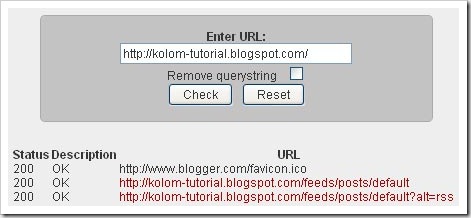
Caranya cukup mudah, anda tinggal mengisi form yang ada dengan alamat blog atau website anda, kemudian klik tombol “check” dan secara otomatis link yang ada dalam website anda akan dicek, silahkan lihat hasilnya.

online_broken_links_checker

Broken Links checker Software

Jika anda kurang menyukai online broken links checker, mungkin bisa mencoba software yang di install pada komputer anda. Beberapa software broken links checker yang bisa didapatkan secara gratis diantaranya yaitu :

1. Xenu's Link Sleuth xenu links checker


2. Free Link Checker
 free link checker
Jika harus memilih diantara kedua software tersebut, kang Rohman lebih memilih menggunakan Xenu's Link Sleuth.


Links Checker Firefox add-ons

Untuk anda pecinta setia Browser internet Firefox, anda bisa menggunakan add-ons links checker.

1. LinkChecker
Dengan Link Checker add-ons ini kita bisa memeriksa status dari link website, apakah masih aktif, di redirect, atau sudah tidak aktif (broken link), namun yang di cek adalah hanya link pada halaman web yang sedang anda buka. Perbedaan status antaar link yang aktif, redirect, atau broken link dibedakan dengan warna pada link yang di cek. untuk mengecek link dalam satu halaman, caranya cukup dengan klik kanan pada halaman web yang anda buka lalu pilih “Check Page Links”.
highliht broken link
Terlihat bahwa link yang broken di highlight dengan warna merah.
Dari hasil analisa, broken link dominan pada link yang terdapat pada kotak komentar postingan yang umurnya telah lama.

2. Pinger
Add-ons Pinger ini cara kerjanya mirip dengan add-ons LinkChecker.

Broken Link Checker Wordpress Plugin

Nah, khusus blog yang menggunakan Wordpress.org alias wordpress self hosted, plugin  Broken Link Checker bisa menjadi alternatif sebagai jalan keluar mengatasi adanya broken link pada blog anda.
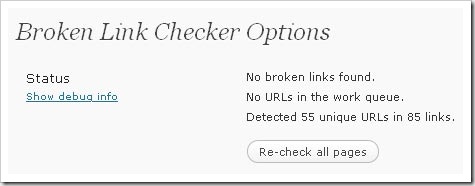
Broken link Checker plugin akan selalu memonitor status dari semua links yang ada dan akan melaporkannya langsung di dashbord blog. Jika ada terdapat broken link, plugin Broken link Checker akan memberi alternatif apakah link tersebut akan di buang, di edit atau langsung di jadikan teks biasa.
link checker plugin

Online Broken Links Monitor

Selain cara-cara diatas, ada juga alternatif lain yaitu dengan menggunakan layanan Online broken Links monitor. Prinsip dasarnya yaitu website yang menyediakan layanan online broken links monitor akan mengecek secara rutin kondisi dari keberadaan link pada website yang kita miliki, kemudian melaporkannya ke email yang kita berikan pada saat melakukan pendaptaran terhadap website layanan online broken links monitor. Berikut layanan yang mungkin anda minati :
1. Link Tiger
Pada dasarnya Link Tiger adalah layanan online broken links monitor berbayar. Namun, ada juga pilihan tidak berbayar alias free, akan tetapi tentu saja fasilitas yang akan didapat berbeda dengan yang berbayar.
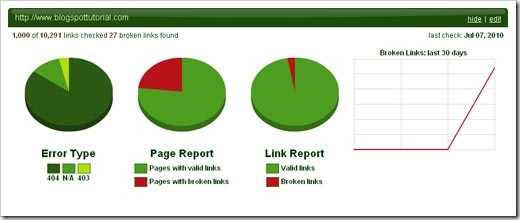
linktiger Layanan gratis Link Tiger mengijinkan hanya satu website atau blog untuk satu account di link tiger. jumlah link yang akan dicek dibatasi sampai 1000 links. Jika pada blog anda memiliki lebih dari 1000 links, maka links yang selebihnya tidak akan di cek statusnya. Hasil dari scanning terhadap link website anda akan di kirim secara rutin ke email yang di daftaran.
link tiger report
Jika hasil pengecekan dari link tiger sudah ada, tentu saja anda harus sesegera mungkin memperbaiki link yang sudah broken tersebut agar tidak berakibat buruk terhadap kondisi website anda.
2. Link Alarm

Link_Alarm
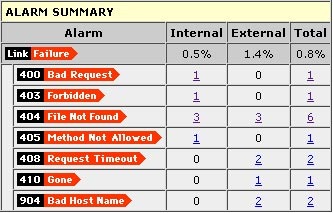
Link alarm adalah layanan mirip dengan Link Tiger. Pada dasarnya layanan ini dalah berbayar, namun ada juga layanan gratisnya. Untuk layanan gratis, website yang akan dimonitor dibatasi hanya 1 website untuk satu accoung di link alarm.
Namun, jumlah link yang akan dicek hanya sampai 100 links, berbeda dengan link Tiger yang akan mengecek 1000 links.
link_alarm_report

Selain layanan diatas, tentu saja masih terdapat ratusan bahkan mungkin sampai ribuan layanan online untuk mengecek keberadaan broken link. Mana yang anda sukai maka gunakanlah.

Rangkuman
Bila boleh membuat sedikit rangkuman dari tulisan diatas, mungkin berikut adalah point point yang bisa diambil.

  1. Jangan biarkan blog atau website anda memiliki link yang telah mati atau broken link, karena keberadaan broken link bisa mebuat kondisi blog anda buruk dimata Search Engine seperti google, Yahoo, dll.
  2. Ada banyak cara atau layanan untuk mengecek keberadaan Broken link, mana yang anda sukai maka gunakanlah.
  3. Jika anda telah mengetahui bahwa ada broken link pada blog atau website anda, maka segera perbaiki agar kondisi website anda selalu baik.
Anda punya alternatif dalam menganalisa keberadaan broken links? silahkan share disini!

[Sumber: Kolom Tutorial]
Continue...


Add an Interactive "Take a Tour" Button to your Blog, Site

Posted by mezzoe blog on Wednesday, July 21, 2010 0 komentar

Think of it as of tutorials which help your web site visitors understand what is the right way to navigate through your web site or use it’s functions properly. Touration is a service for adding great looking help callouts to the elements of your web site without any scripting, using just a visual editor. Increase readership and improve bounce rate by helping your visitors in the right place at the right time.
Tip : Best 2 Ways to Include Photos in Blog, Website Legally

Touration (Link) – Add Cool Guided Tour Widgets on your Site

Add an Interactive "Take a Tour" 
Button to your Blog, Site
Once a visitor comes to the page which has the tour he will see a special button which starts the tour. By clicking on it your visitor will be able to see all the callouts you have created for this page one by one using just one mouse button.
This tour STARTING button can be placed on any page side. Visual style of the button and the callouts can be changed to correspond to your web site design.
Add an Interactive "Take a Tour" 
Button to your Blog, Site
Once you have created tours for any number of pages of your web site you will be able to manage them, add or remove callouts, add or remove more pages and change tutorial text for each callout directly from the management panel. You can cover a group of dynamic pages which use parameters in the URL with one unified tour by defining simple wildcards for URL matching.
Add an Interactive "Take a Tour" 
Button to your Blog, Site
You create textual callouts for any particular element of your web page or for a group of elements by simply pointing to them with a mouse. Summary of help callouts created for a page form a tour for the page. You can create such tours for as many pages of your web site as you need.
Also See : Find Page Rank of Internal Pages in your Blog, Website
Related posts:
[Source: SnapHow.com : Web & Computing Tips]
Continue...


Problem: Can’t Upload Files, Photos to Internet, FTP 0 Byte Upload Errors

Posted by mezzoe blog on Wednesday, July 21, 2010 0 komentar

I was facing this problem where I couldn’t upload files to internet, which included can’t upload photos on facebook, can’t upload images, files, can’t upload anything online. Not only this, I was having trouble with my ftp uploads too. I saw I can’t upload files in FTP. I was getting a 0 byte file uploaded on the server. I was completely confused since I didn’t know what was going on.

Fix : Can’t Upload Files, Photos Online to Internet

The best way to troubleshoot problems is to check step by step, if any recent settings might be causing this problem.

- Step 1 : How to know if you Really Can’t Upload  Files, Photos etc Online

Well, this is easy to know. Any upload based online web applications stop working. This mean you can’t upload photos on facebook, can’t upload files on online file managers etc.
Another way I checked was at speedtest.net. It is flash based tool to estimate your download upload speed of you internet connection. When I tried, the download estimation worked fine, but while calculating the upload performance the tool stopped responding. This clearly indicate that something is wrong with file upload system in my PC.

- Step 2 : Check Exactly How Serious the "Can’t Upload Files" Problem Is

What I mean is, sometimes there might be a simple corrupted  addon, plugin in your browser which creates problem uploading files to internet.
Try Switching Browsers, check with different types of browsers, in most cases the browser is the problem maker. For eg: I remember after I installed a plugin (download manager for faster downloads in Firefox), I was facing some sort of errors while uploading and downloading files. I removed it and every thing was fine.
If Possible, Try the same Broadband Connection with a different PC, as this will let you know if there are any local problem with your ISP (Internet Service Provider). I use a BSNL connection, and they are renowned for their service downtime issues. Manage a Laptop and connect to internet from that laptop in the same way as in your pc, which will solve your file upload problem in most cases. If you still can’t upload anything there might be an error with your modem or router settings (see below)

- Step 3 : Does Your PC have a Problem

I know you have heard these everywhere. But they really work. Try the following steps :
System Restore : This is a life saver. I have been rescued from so many other problems with this option. It basically restores the Windows Registry (the core of your os) to any recent backup made during a critical system settings change. Go to Start > Accessories > System Tools > System Restore and restore it to few days earlier to the file upload problem. Work most of the times…
Anti-Virus + Firewall : Sometimes this combo overreacts to your internet actions and disables suspicious internet activity from your PC. But, it fails horribly sometimes disables access to many http and ftp protocols in your windows network services which is why you can’t upload files, and sometimes cant access websites. Simply, disable the Firewall, stop the antivirus and try uploading files.
Re-Install Windows : I know this is painful since it formats the drive, like I mentioned in Step2, try from a different computer, but if you don’t have a laptop or a 2nd PC. This is the only way to troubleshoot. This is because this is the best way to start from scratch when you don’t know why you can’t upload files and other similar network problems.
Still, can’t upload anything ? Then Step 4 is the only hope.

- Step 4 : Check Modem, Router’s Internet Settings

None of the above steps worked for me, so this was my only hope. But this step did…
Why Couldn’t I Upload Files ? Recently, I reset my router to access the admin settings page to enable wireless (wi-fi) in my home. Now the "can’t upload files" problem started after that, and this is why…
After resetting my router all the Internet Settings in the router becomes default. Well this is good but not always. After a lot of searching online I found that there is a option called TCP MTU (details) (Maximum Transmission Unit of a single data unit (e.g., a frame). MTU sizes are measured in bytes), set to 1500 bytes by default in your router’s internet settings. This means you can’t upload files more than 1500 bytes (LOL). Simply set it to 0 to remove this restriction. (See below).

Set TCP MTU Settings in Router (eg : UTstarcom, BSNL)


  • Go to http://192.168.1.1/ (your router’s setting page)
  • Go to Interface Setup and Click Internet
  • Look for the TCP MTU option.
  • Generally 1500 bytes is set. Set it to 0.
  • Click Save.
  • Go to Maintenance (tab) > SysRestart > System Restart with : Current Settings
  • Click Restart and wait for the 2nd Message "System Rebooted"

OR, Set the MTU Size for the Network Interface (Router) Manually from Registry (Not Recommended)

Note : Follow this step only if you can’t access your router settings page as above. If you set the MTU size for a network interface manually, this setting overrides the default MTU for the network interface. To set the MTU size Router, follow these steps:
  1. Click Start, click Run, type regedit, and then click OK.
  2. Locate the following key in the registry: HKEY_LOCAL_MACHINE\SYSTEM\CurrentControlSet\Services\Tcpip\Parameters\Interfaces\<ID for network interface>
  3. On the Edit menu, point to New, and then click DWORD Value.
  4. Type MTU, and then press ENTER.
  5. On the Edit menu, click Modify.
  6. In the Value data box, type the value of the MTU size, and then click OK.
  7. Quit Registry Editor, and then restart the computer.
After this simple setting, my file upload problem vanished… So if you can’t upload files, please follow these steps and let me know in comments if it helped you.
Suggestions are Welcome…
Also See : Enhance, Boost Internet Connection Speed
Related posts:


[Source : SnapHow.com : Web & Computing Tips ]
Continue...


Tools to Send DOS (Denial of Service) or Half Sync to Certain Website's Server to Its Analyze Weakness

Posted by mezzoe blog on Saturday, July 17, 2010 0 komentar

how to test send dos or half sync to server helping analyze the exploit hole

DoSHTTP is an easy to use and powerful HTTP Flood Denial of Service (DoS) Testing Tool for Windows. DoSHTTP includes URL Verification, HTTP Redirection, Port Designation, Performance Monitoring and Enhanced Reporting.

DoSHTTP uses multiple asynchronous sockets to perform an effective HTTP Flood. DoSHTTP can be used simultaneously on multiple clients to emulate a Distributed Denial of Service (DDoS) attack.

DoSHTTP can help IT Professionals test web server performance and evaluate web server protection software. DoSHTTP was developed by certified IT Security and Software Development professionals.

Download Here


[source: supermicroblog]
Continue...


Create Amazing ASCII Text Designs Logo, Text Graffiti Art

Posted by mezzoe blog on Friday, July 16, 2010 0 komentar

ASCII Art has a long history among geeks. Here are a few online tools to help you create amazing looking ascii text designs and graffiti logos out of just plain text. You can also convert images into ascii art.
Tip : Convert Photos into Mosaic Images

Top 3 Text to ASCII Art Converters Online

  • TAAG (Link) Text Ascii Art Generator

Create Amazing ASCII Text Designs Logos, Text Graffiti
This is probably one of the best ascii text generator acc. to me. It has lot of cool fonts and popular graffiti fonts. In fact you will find all types of fonts you see in arcade video games. Plus there are various options  like the "Test All" which generates ascii logo version of a text word in all the possible fonts.
Tip : Recognize Font from Image, Text Inside Pictures
  • Asciimo (Link) Create ASCII Text Art Online

Create Amazing ASCII Text Designs Logos, Text Graffiti

To create amazing ASCII text designs written in cool original typography, you can use a free service called Asciimo. In seconds you can create your own custom written ASCII. Write the words you want to convert to ASCII and select from obver 100 font typefaces. Copy the text to save it.
Tip : Find Difference Between Two Files XML, Text Documents
  • AsciiConvert (Link) Convert Images to ASCII text

See the top right pic in this post generated with AsciiConvert.
Image upload : You can also upload images and convert them. They will only be uploaded once. After that, you can try resizing and changing the images, without having to wait for the upload each time. Supported image file formats: JPEG, GIF, PNG, BMP and most others.

Create Amazing ASCII Text Designs Logos, Text 
Graffiti

URLs to images : To convert an image to ASCII, you have to enter the address to the image location. You can usually get this by right-clicking on the image and choose COPY IMAGE LOCATION, or something like that.

Also See : Draw Human Body Step by Step in Different Poses
Related posts:

[source:  SnapHow.com : Web & Computing Tips]
Continue...


Top 12 Websites With PageRank 10 /10

Posted by mezzoe blog on Thursday, July 15, 2010 0 komentar

Link Popularity vs. PageRank vs. Yoda

Although Google says page rank doesn’t matter much, but it still looks great to see who tops the list. Here are the list of PageRank 10 sites in the World:
  1. http://www.google.com/ — Google homepage
  2. http://www.w3.org/ — World Wide Web Consortium
  3. http://www.usa.gov/index.shtml — US Government website
  4. http://www.hhs.gov/ — US Department of Health and Human Services
  5. http://www.whitehouse.gov/ — The While House
  6. http://go8.edu.au/ — Group of Eight (Education)
  7. http://india.gov.in/ — National portal of India
  8. http://www.miibeian.gov.cn/ — Miibeian (China’s IT department site)
  9. http://us.cnn.com/ — CNN
  10. http://get.adobe.com/reader/ — Adobe Reader & http://get.adobe.com/flashplayer/ — Adobe Flash Player
  11. http://www.facebook.com/ — Facebook
  12. http://www.addthis.com/bookmark.php — AddThis social bookmarking widget
5 sites in the list are government websites .2 PR10 sites are Adobe’s and the only PageRank 10 sites for software. Facebook, the World’s most popular social network site, is in the list, too. The AddThis bookmarking widget made in the PR10 list is surprising me. I think the direct links from all the websites that use the AddThis widget boost its PageRank.
Also See : Find Page Rank of Individual Pages in your Blog, Website

Related posts:


[source : SnapHow.com : Web & Computing]
Continue...


Top 10 Sites to Maintain, Track Your Fitness Journal Online

Posted by mezzoe blog on Wednesday, July 14, 2010 0 komentar

You’re on fire with enthusiasm and desire to take control of your body and whip it back into shape.  You know the importance of planning and tracking when it comes to reaching fitness goals.  At the same time you love technology and would really like to use the Internet to help track your journey to fitness.

Best Websites to Keep Track of Your Fitness Online
You’ve come to the right place.  Let’s take a look at the top 10 resources on the Web for maintaining a fitness journal.

Tip : Make Yourself Look Slim & Thinner in Photos


Best Websites to Keep Track of Your Fitness Online


  • BodyDaemon (Url)

BodyDaemon offers a free online fitness journal where users can record every aspect of their workouts (duration, weight lifted, repetitions, distance traveled, etc), daily food intake, and body measurements such as waist, weight and muscle sizes, and goals.  There are a number of custom reports and graphs that can be created and analyzed.  The nice thing about BodyDaemon is that it works like a fitness community where other members can help coach one another and discuss various fitness topics.  There are even forums for discussing injuries, ways to publish articles and fitness ideas, and a tools to map a distance run, walked or cycled where the tool will calculate the distance for you.  It is free, cool analysis toos and has a Facebook feel to it, so it nabs the top fitness journal spot. 

  • MyFitnessJournal (Url)

MyFitnessJournal is a free journal for tracking fitness and nutrition on the web.  It will allow the user to keep track of foods, exercises, and measurements daily.  It has easy to use reports and allows the user to customize their journal and share it with others.  There are over 8000 foods and 500 exercises in the journal’s database.  This site excels when it comes to the simple and painless food entry which minimizes time adding food entries and maximizes the user’s time viewing results and charts.  For the cost (free) and what it has to offer, this fitness journal is hard to beat.

  • MyFitnessJournal (Url)

The fitness journal offered by Strength and Body is touted as the world’s first workout journal blog community.  The fitness journal allows the user to create a free online workout journal and blog.  It offers customizable information pages about “you”.  It also has a very efficient workout entry tool.  The journal and blog can also be personalized with a number of different themes.  Users also get 10MB of free storage for personal videos and photos which can be embedded into workout entries and blog posts.

  • FitNovo (Url)

FitNovo is an online fitness journal that helps users plan for specific goals.  Some goals include losing 20 pounds, running a marathon, and increasing one’s bench press.  This is called the “plan” phase.  The next step is the “do” phase where the tool helps users track their nutrition and helps them make better food choices.  The final phase is the “become” phase which helps users track their fitness progress and refine their routines for better results.  FitNovo also has a number of fitness calculators, a workout program manager, fitness articles and an exercise database.

  •  Fitday (Url)

Fitday allows you to track your nutrition, exercise, and weight loss goals.  As you track your progress you can review things like calories burned, nutrition eaten, and weight loss.  The basic membership is free and includes daily calorie counts, detailed nutrition for lots of foods, long term diet analysis, and more.  They also have a premium membership which will get rid of advertising, allow custom tracking and unlock advanced reporting.

  • FitnessJournal (Url)

This resource allows you to enhance your diet and exercise program via an interactive tool to manage your diet and workout information.  It also allows you to track up to 72 different activities and sports with the fitness journal.  Fitness Journal is a web based program that allows users to keep track of fitness, health, and weight loss goals and customize reports.  It also has discussion groups that allows members to communicate with one another.  It has various levels of membership with a one month membership going for $7.95 and 3 year membership going for $89.95.  If you like bells and whistles, you’ll love the fitness journal.  It even has an iPhone App.

  • DailyBurn (Url)

DailyBurn is very easy to use.  It allows users to track what they eat with a few mouse clicks and there is almost no data entry.  Recording workouts is fast and easy, too.  You can also network with other people which works as a source of accountability for reaching fitness goals.  It is free to join and there is even a (iPhone App for tracking your fitness).  It doesn’t have the deep analysis tools of some of the other online journals but if you are looking for help with motivation and accountability, then this is the fitness journal for you.

  • BodyGain (Url)

The BodyGain fitness journals are a set of free fitness journals with a dynamic charting system. BodyGain allows the user to track weight and a number of measurements.  It also can be used for setting goals, reminders, and has a number of rich graphical charts for analyzing results.  If your looking for a journal for tracking goals and body measurements, then this is the journal for you.  It doesn’t have much in the way of tracking workout routines or diet information though that is planned for in the future.

  • FitSugar (Url)

The Fitsugar fitness and food journals are geared more towards women.  They are free for download and printing and allows the user to pencil in their workout plan as well as keep track of food intake.  Although they are more hands-on, the printouts are nice and straightforward for tracking fitness and nutrition.

  • ActivityFitnessJournals (Url)

The activity fitness journals offered are training logs that cater to one of three sports; golf, running, or general exercise.  The guide is formatted for the user to write their goals, weekly events, self-assessments and accomplishments.  It is more hands on and doesn’t have any bells or whistles but the printouts that you get (192 total) for $15 are rather nice and will cover 12 months of progress.
About Author : This post has been contributed by Nick Clipton from Building Body Muscles. Nick likes to write about gaining muscle and latest home gym gadgets. You can follow his posts by subscribing to his site via rss or email.
He previously wrote about New Generation Exercise n Play Console Games
You can also submit Guest Posts. Click Here


Also See : Make Yourself Look Older in Photos, Pictures Online
Related posts:
 

[source: SnapHow.com : Web & Computing Tips]
Continue...